The Complete Flutter Roadmap for Beginners to Master Flutter in 2025

Shohruh AK
Flutter Engineer | Content Creator
If you’re planning to learn Flutter in 2025, you’ve chosen the right time — and the right framework. Flutter has matured into a complete cross-platform solution that powers apps for Android, iOS, Web, Desktop, and even embedded devices.
But with so many tutorials, videos, and frameworks out there, it’s easy to get lost.
This article is your step-by-step roadmap to take you from absolute beginner to production-ready professional developer, in a clear and structured path.
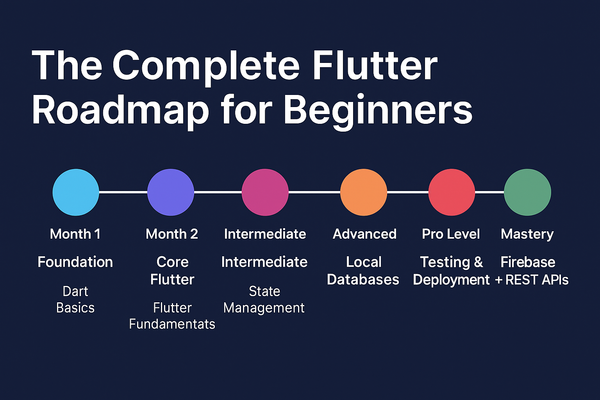
🗓️ Flutter Mastery Timeline (6-Month Plan)
| Month | Phase | Focus Area | Goal |
|---|---|---|---|
| 1 | Foundation | Dart Basics + Flutter Fundamentals | Understand Dart and build your first Flutter UI |
| 2 | Core Flutter | Widgets, Layouts, Navigation | Build complete static apps |
| 3 | Intermediate | State Management, API Integration | Build dynamic apps with GetX or Provider |
| 4 | Advanced | Local DB, Animations, Clean Architecture | Build production-ready structured apps |
| 5 | Pro Level | Testing, Performance, Deployment | Publish a polished app |
| 6 | Mastery | Firebase, REST APIs, CI/CD, AI tools | Build, automate, and ship scalable apps |
🏁 Phase 1 — Flutter & Dart Foundations (Month 1)
Before you dive into Flutter widgets, learn Dart — the language that powers Flutter.
🔹 What to Learn
- Dart Syntax: variables, data types, loops, functions
- OOP Concepts: classes, constructors, inheritance, mixins
- Async Programming:
Future,async/await, Streams - Null Safety: why
?and!matter in modern Dart
🔹 Tools to Set Up
- Install Flutter SDK from flutter.dev
- Use VS Code or Android Studio
- Connect an emulator or physical device
🧠 Practice Tasks
- Build a simple “Hello Flutter” app
- Create a counter app without using templates
- Print your name and age using Dart in the console
⚙️ Phase 2 — Flutter Core Concepts (Month 2)
Now you’re ready to understand how Flutter actually works.
🔹 Learn Flutter Widgets
- StatelessWidget vs StatefulWidget
- Common widgets:
Container,Row,Column,Stack,ListView,TextField,Image,Card - Layout & Constraints (important for responsive design)
- Navigation:
Navigator.push/pop, named routes
🧠 Practice Tasks
- Build a static “Profile App”
- Create a “To-Do List” UI (no functionality yet)
- Build a navigation drawer and a bottom navigation bar
💡 Tip: Get comfortable with the Flutter Widget Catalog — it’s your new best friend.
🧩 Phase 3 — State Management & APIs (Month 3)
This is where you start writing real apps that fetch and display data.
🔹 Topics to Master
- State Management (choose one):
- GetX (recommended for simplicity)
- Provider / Riverpod / Bloc (optional advanced choices)
- HTTP requests (
httpordiopackage) - JSON serialization
- App architecture basics (MVC, MVVM)
🧠 Practice Tasks
- Build a “Weather App” using free weather APIs
- Create a “Quotes App” that fetches quotes from a REST API
- Add a loading indicator while fetching data
⚙️ Pro Tip: Structure your code using
controllers/,models/,views/, andservices/folders for maintainability.
🧱 Phase 4 — Database, Animations & Architecture (Month 4)
You’ve built apps that fetch live data — now let’s make them offline-capable and beautiful.
🔹 Topics to Learn
- Local Databases:
sqflite(SQL-based)hive(NoSQL-based)
- Animations:
- Implicit:
AnimatedContainer,AnimatedOpacity - Explicit:
AnimationController,Tween,Curves
- Implicit:
- App Architecture:
- Clean Architecture or MVVM
- Dependency injection using GetX or get_it
🧠 Practice Tasks
- Create a Notes App with sqflite
- Animate a “Like” button or “Login” transition
- Refactor your previous project using a clean folder structure
🎯 Goal: Your app should now look professional, with smooth transitions and persistent data.
🚀 Phase 5 — Testing, Optimization & Deployment (Month 5)
Now you’re building production-level Flutter apps.
🔹 Topics to Learn
- Debugging: using Flutter DevTools
- Testing: unit, widget, and integration tests
- Performance Optimization: profiling, reducing rebuilds, image caching
- Building for Release:
- Generate release APKs and iOS builds
- Add app icons and splash screens
- Versioning and signing your app
🧠 Practice Tasks
- Write widget tests for your app
- Optimize navigation and rebuilds using GetX
- Publish your first app to Google Play
☁️ Phase 6 — Advanced Flutter (Month 6)
Now you’ll connect your app to powerful real-world systems.
🔹 Topics to Explore
- Firebase Integration:
- Authentication (email, Google, phone)
- Cloud Firestore & Realtime Database
- Firebase Storage & Push Notifications
- APIs & Backend:
- REST API integration
- Node.js / Supabase / Django backend
- CI/CD Automation:
- Use Codemagic or GitHub Actions
- Automate build and deployment
- AI Integration (2025 Trend):
- Use Gemini CLI or OpenAI API for smart assistants
🧠 Capstone Project
- Build a Complete Flutter App, e.g.:
- Expense Tracker with Firebase
- Chat App using Firestore
- Workout Tracker with sqflite + GetX
- Deploy it to Play Store and share on GitHub
📈 Bonus: Tools and Libraries Every Flutter Pro Should Know
| Category | Recommended Packages |
|---|---|
| State Management | GetX, Riverpod, Bloc |
| Networking | Dio, Http, Retrofit |
| Database | sqflite, Hive, ObjectBox |
| Animations | Rive, Lottie, flutter_animate |
| UI Enhancements | Shadcn UI, Flutter Neumorphic, CachedNetworkImage |
| Auth / Backend | Firebase, Supabase, Appwrite |
| Localization | easy_localization, intl |
| Utilities | logger, shared_preferences, url_launcher |
🎓 How to Stay Sharp as a Flutter Developer
- Contribute to open-source packages — learn by reading others’ code.
- Follow the official Flutter repo for updates.
- Build small apps regularly — learning by doing always wins.
- Join communities:
- r/FlutterDev
- Flutter Community on Medium
- [Discord / Slack Flutter Groups]
🏆 Final Words
Becoming a great Flutter developer doesn’t require superpowers — just consistency and curiosity.
Start with Dart, learn widgets, master state management, connect to APIs, and gradually dive into databases, testing, and deployment. By the end of 6 months, you’ll be fully capable of building and publishing your own professional apps.
💬 “Don’t just learn Flutter — build with it every day. The more apps you make, the faster you’ll master it.”